EAZ-FIX logo  
Home | Buy Now |Contact Us
 
 
EAZ-FX Instantly undo your PC problems
 
download EAZ-FIX
EAZ FIX trial
Supports Windows 2000, XP, Vista and Windows 7
buy EAZ-FIX
 
title roll
 
EAZ-FIX works with Windows 7   EAZ-FIX is a robust backup and restore utility for home users and IT professionals that allows PC users to immediately restore a PC to a time before certain events occurred. EAZ-FIX makes it easy for users of all skill levels to go back and repair PC issues - saving time, money and PC trouble. With EAZ-FIX you can.
More about this robust system restore utility


eaz-fix benefits EAZ-FIX by Horizon Datasys
  • Reverse any system crash
  • Backout of any failed software installations, botched update
  • Roll back minutes, hours, or even months
  • More EAZ-FIX benefits


complete windows system restore solution - Drive Vaccine
 
eazfix boxshot   Windows System Restore can only restore Windows "System Files" and "Some" Program files. EAZ-FIX functions at the sector level of the hard drive and restores every bit of data - in essence making your PC a virtual time-machine.


easy fix testimonials
 
 
  logo gateway          The features of RollBack Rx/EAZ FIX are so Impressive... It has instantly increased our IT productivity, by streamlining our PC restoration tasks.  
 
  Mike Trover, Trade Show Inventory Manager
Gateway Computers Inc.


Go Back...Instantly Recover From Virus Attacks, Software Installations or User Errors

 
eazfix works with windows 7   EAZ FIX™client is a robust system restore utility that enables home users and IT professionals to easily restore a PC to a time before certain events occurred. EAZFIX makes it easy for users of all skill levels to quickly and easily repair PC issues - saving time, money and PC trouble. With EAZFIX you can...
 
  • Reverse any system crash (even if Windows can't startup)
  • Backout of any failed software installations, botched update etc.
  • Reverse user errors manually, or set Restore-on-Reboot or Log-off
  • Roll back minutes, hours, or even months.
  • Roll backwards and forwards to any system snapshot
  • Allows users to safely test any software. Fast, 100% clean uninstaller
  • Roll-back, yet recover files from your "future" snapshot(s)
  • Retrieve files from a crashed PC, even if Windows can not boot
  • Access control - prevent unauthorized users from access
  • Automatically schedule snapshots or hard drive restores
  • Day Zero Disaster Recovery with no data loss
  EAZ-FIX instantly undo your PC problems

EAZ-FIX® Highlights

 
EAZ-FIX significantly reduces PC trouble shooting, repairing and restoring time to seconds! Empowering both home users and enterprise IT support personnel to achieve tremendous savings of time and money on maintaining their computers.
  easy fix works with windows 7
 
  • EAZ-FIX doesn’t impact performance
  • Can be remotely managed and deployed (Enterprise console)
  • EAZ-FIX™ only takes 0.1% of total hard disk space.
  • Supports virtually unlimited snapshots.
  • Takes less than 3 seconds to create a new snapshot.
  • Creates a complete system snapshot without restarting the system.
  • Create new snapshots manually, automatically or upon file execution.
  • Revert file histories from any of the 60,000 snapshots.
  • Restores a completely crashed system to any snapshot in seconds.
  • Restores a completely crashed system with data up to the second of crash.
  • Restores entire system to any of the 60,000 snapshots.
  • Restores system to any snapshot with data synchronization.
 
  • Configure the system to automatically restore to a snapshot of your choice.
  • Highly configurable interface - hide program interface from end users.
  • Dynamic disk space management - disk space is recovered upon snapshot deletion.
  • Intelligent disk space monitoring - informing users of disk space usage of each snapshot.
  • Offers flexible and powerful access control.
  • Supports Multi-boot systems and VM Ware.
  • Consists of multi-partition protection selection.
  • Incorporates quick reset of system baseline.
  • Offers detailed program operation logging.
  • Supports all industry standard deployment options.
  • Provides completely hands-free, silent background installations.
  • Includes configuration during installation. Customizes the program upon installation.
 
*The blue screen of death (BSoD) is the screen displayed by Microsoft's Windows operating system when it cannot (or is in danger of being unable to) recover from a system error. There are two Windows error screens that are both referred to as the blue screen of death, with one being significantly more serious than the other.   EAZFIX by Horizon Datasys


EASY-FIX by Horizon Datasys   EAZ-FIX is a robust system restore utility that enables home users and IT professionals to easily restore a PC to a time before certain events occurred. EAZ-FIX makes it easy for users of all skill levels to quickly and easily repair PC issues - saving time, money and PC trouble.

EAZ-FIX is flexible and can be used to protect your PC in many different ways, and solves most PC related issues...

line

Your Complete Windows System Restore Solution

sector level restore software   Windows System Restore can only restore Windows "System Files" and "Some" Program files. EAZ-FIX functions at the sector level of the hard drive and restores every bit of data - in essence making your PC a virtual time-machine.
line

Your Daily Continuous Backup Solution

Continuous Backup Solution   EAZ-FIX reduces the dependancy for daily backups or carrying duplicate images of hard drives. EAZ-FIX is different from traditional backups in that it allows you to take continuous backup snapshots of your system silently in the background while using minimal system resources. Each backup snapshot take only 2 to 3 seconds. EAZ-FIX allows users and/or administrators to create a “snapshot” of the entire system at a specific time or on a fixed schedule (hourly, daily etc). You can take as many snapshots as you would like and you can roll-back and roll-forward from any snapshot at any time...
line

Your Software Uninstaller

  EAZ-FIX allows users to safely test software, security updates and more. When you take a snapshot prior to installing any software or critical update etc. - EAZ-FIX recognizes how your hard drive is composed at the bit level prior to the installation/update. If you are unhappy with the installation you can safely uninstall all components with a few mouse clicks. EAZ-FIX guarantees 100% bit level recovery - translating to absolute uninstallation of any software quickly and easily.
line

Day Zero Protection & Disaster Recovery Solution

Day Zero Protection & Disaster Recovery Solution   EAZFIX is designed to protect both the user and PC from accidental user errors and day-zero attacks. Without restricting the users’ activities, EAZ-FIX will transparently take system snapshots on a schedule that you configure for your system. If a virus, malware or even *BSoD occurs – You can restore your system up-to-the-minute of the system crash. With no data loss. Making EAZ-FIX the only Day Zero disaster recovery solution that can guarantee no data loss, even if Windows is unbootable.
line

Enterprise Level Network Administration

Enterprise Level Network Administration   The EAZ-FIX client is a software application that is setup onto each PC that requires EAZ-FIX protection. The EAZ-FIX Client is the only application that is required to be installed on stand-alone PC's or PC's that do not require remote network management capabilities. For large networks that require remote administration your organization may use our EAZ-FIX Enterprise Console (RMC).

EAZ-FIX offers an additional Enterprise console for EAZ-FIX - enabling administrators to configure all of the EAZ-FIX client installations over a enterprise level remote management console. Simplifying the workload of the network administrator while providing all client-based functions on a remote console.


Features

  EAZ-FIX works with Windows 7
 
  • Support for Windows 2000, XP, VISTA, Windows 7
  • Custom setup options
  • Advanced Setup with program configurations
  • Advanced Setup Configuration Wizard (ASCW)
  • Deploy with network shares
  • Deploy with client side scripts
  • Deploy with server side deployment software
  • Deploy with Windows active directory
  • Deploy with Ghost system images
  • Restore system from local sub O.S.
  • Restore system from local Windows
  • Restore system from remote web interface
  • Restore system with batch files
  • Restore system on restart
  • Restore system on log off
  • Restore system on a one time schedule
  • Restore system on a daily schedule
  • Restore system on a weekly schedule
  • Restore system on a monthly schedule
  • Snapshot current system before restoring
  • No data lost system restore
  • Recovery of corrupted, deleted files
  • File history reversions
  • Maximum snapshots 60,000
 
  • Lock snapshots
  • Delete snapshots
  • User defined snapshot propertie
  • View snapshot properties on local PC
  • View snapshot properties through web interface
  • Create a new snapshot from the local sub O.S
  • Create a new snapshot from local Windows
  • Create a new snapshot from remote web interface
  • Create a new snapshot with a batch file
  • Create a new snapshot on system restart
  • Create a new snapshot on a one time schedule
  • Create a new snapshot on hourly schedule
  • Create a new snapshot on daily schedule
  • Create a new snapshot on weekly schedule
  • Create a new snapshot on monthly schedule
  • Create scheduled snapshot within time range
  • Create a new snapshot based on a user defined event
  • Lock scheduled snapshot
  • Manage snapshots from a central web interface
  • Reset system to baseline
  • Create a new baseline
  • Disable access control
  • Built-in administrator account
Find out how EAZ-FIX compares with GoBack.   EAZ-FIX by Horizon Datasys


EAZ-FIX Screenshots

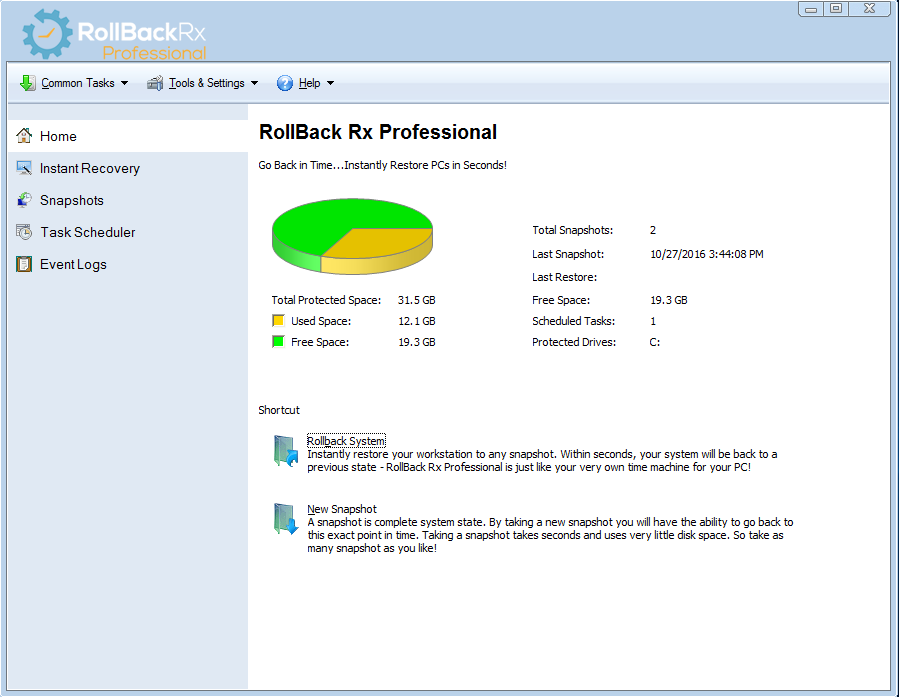
EAZ-FIX Snapshot History   EAZ-FIX Program Settings   EAZ-FIX Advanced Program Settings
Snapshot History

Program Settings

Advanced Program Settings

  EAZ-FIX Schedule Snapshots   EAZ-FIX Automated Restores  
Schedule Snapshots

Automated Restores


Other Comparable Solutions: GoBack, Ghost, Rapid Restore, Recovery Genius

COMPARISON CHART
Features EAZ-FIX GHOST RAPID RESTORE RECOVERY GENIUS GOBACK
Space required 0.07% total disk space 50% to 100% of system size 50% to 100% of system size 30% to 40% of disk space 20% to 40% of disk space
Restore time Seconds Many minutes Many minutes Minutes Minutes
Restore points Up to 60,000 1 1 10s hundreds
Time to create a
new restore  point
3 seconds Many minutes Many minutes Many minutes with system shutdown Minutes
Restore with data
up to the second
yes no no no no
Auto restore  options yes no no yes yes
3rd party media
required
no yes yes no no
Hidden partitions required no no yes no no
Dynamic space management yes no no no no
Configuration management ability yes no no no no
Deployment strategies yes no no no no
Detailed operational logging yes no no no yes
Dynamic user access control yes no no no no
VMware support yes no no no no
 

COMPETITOR: SYMANTEC GOBACK®

Formerly known as Roxio Goback, Adaptec Goback, Norton Goback as well as other names, Goback has been sold and transferred frequently from one company to another. We can only assume it has not been pleasing its vendors. Goback is the only competitor software close enough to be shown on the EAZ-FIX™ radar screen. Goback's comparison and competitiveness is limited.  Its technology based on a file level monitoring and logging technique. It needs to consume a large chunk of the hard disk space to create a change history file. The monitoring system is picking up every little bit of file changes regardless of whether or not, it is worth to know or see. A simple system restart will generate 100s of file changes to log. It really makes one wonder if more truly is better; in Goback’s case, more is definitely not better. The details file change history logging consumes the hard disk space quickly, not to mention, the tremendous pressure it puts on system resources. Currently Goback does not support Microsoft Vista.
 

COMPARE: SYMANTEC GHOST®

Formally known as Norton Ghost, Symantec Ghost® is the most popular computer system backup and imaging software. It allows users to make a copy of the entire system to an image file. The file can then be stored on CDs or network servers. In a case of disaster recovery, users can restore the image back onto the computer. The solution offered by Symantec Ghost is a slow solution, it takes several minutes or longer in most cases to create or restore the image file. The Ghost solution is a costly solution, the image file might be as large as the system itself or half of the system size in compressed format; However, compression takes a big toll on restore time. The Ghost solution is also a partial solution. Due to the amount of time and space required to create image files, it is impossible for users to create frequent backup image files. Therefore, in a case of disaster recovery, users are most likely to restore back to the date of initial P.C. setup condition. All the programs, files and data created afterwards are permanently lost.
 

COMPARED TO: IBM RAPID RESTORE®

Rapid Restore is the latest system recovery solution provided by IBM (now Lenovo) with their new PCs in attempt to replace the OEM recovery CDs. The software reserves a portion of the hard disk space to store a complete factory release image of the system. The reserved disk space is programmed as a hidden partition, inaccessible to most common users; however, an experienced user can remove the hidden partition easily. And thereby, leave the system unrecoverable. As a system imaging software, Rapid Restore shares the same deadly weakness with Symantec Ghost; it is only a partial solution. In a case of disaster recovery, users are set back to the initial factory release condition. All the programs, files and data created afterwards are permanently lost. Rapid Restore is also not rapid, as its name implies.. It takes many minutes to restore a system.
 

COMPARED WITH: GOLDENSOFT RECOVERY GENIUS®

Recovery Genius® takes the reboot-and-restore concept  further. It works deep within the hard drive and OS drivers and freezes the PC's settings. Technically speaking, its technology is based on a hard disk sector filtering technique. Recovery Genius reserves a portion of the hard disk space for redirecting the disk I/O commands. It allows users to keep the information in the protected space during restarts. It takes significantly less amount of space than the conventional imaging approach. Therefore, the time to restore is much less than Ghost or Rapid Restore. Everything seems ideal so far, until you run the Recovery Genius for the first time! It does not allow you to restore individual files from the backup storage, so it is all or nothing. Unfortunately, you can only get data you HAD and loose data you HAVE when you select a restore. This significant weakness is driving Recovery Genius away from common and corporate users. Recovery Genius is mainly valued as an restore-on-restart solution for the publicly shared PC markets.
 
As you can clearly see - EAZ-FIX is the most advanced computer system and data maintenance software that has ever been created. 
  • It offers the most restore points.
  • It takes least amount of disk space.
  • It takes least amount of system resources.
  • It offers most configuration options.
  • It is the fastest to create a restore point.
  • It is among the fastest to restore.
  • It is the only one to allow users to restore without data lost.
  • It is the only one to offer dynamic access control.
  • It is the only one to offer dynamic space management.
  • It is the easiest to operate
 
.
footer left
  Home | Buy Now| Contact Us
Copyrights © 2000-2009 Horizon DataSys
BBB seal
footer right